


To list multiple positions at the same company on a resume, group every role under one company heading with your total dates of employment, then list each job title in reverse chronological order with its own dates and bullet points.
Choose to stack the titles when the work stayed similar, and separate them when the responsibilities changed.
Which format should you use for multiple roles at one company?
Choose the format based on how much the roles differed.
Stack the job titles when the work stayed similar and one role led into the next and separate each role when the responsibilities, department, or seniority changed.
The clearer your progression looks at a glance, the faster a hiring manager can follow it.
Getting this right matters because 61% of hiring managers read the experience section first (Resume.io, Resume Statistics, 2025).
Multiple roles at one company follow the same rule as writing your resume in general: lead with what matters most to the reader, and remove anything that slows them down.
| Format | Use it when |
|---|---|
| Stack the titles | Roles were similar and one led to the next, such as a straightforward promotion |
| Separate entries | Responsibilities, department, or seniority changed noticeably between roles |
| List the company twice | You left the employer, worked elsewhere, then returned |
| Career progression section | You held several older roles at one employer that no longer need full detail |
| Two titles, one period | You held two roles at the same time |
Each format below includes an adaptable example and a template you can copy.
How do you stack job titles for similar roles?
Stack your titles when you moved between similar roles at the same company, such as a promotion that kept your core work the same.
List the company name once with your total dates, place each job title underneath in reverse chronological order, and write one shared set of bullet points that covers your combined achievements.
Stacking keeps the entry short, which helps when 24% of hiring managers spend under 30 seconds reviewing a resume (Resume.io, Resume Statistics, 2025).
Lead the shared bullets with your most senior responsibilities, and use the first bullet to name any promotion so it is impossible to miss.
Adaptable example of stacked titles for similar roles:
Mackin Stores, San Diego, CA
Warehouse Manager (January 2019–Present)
Warehouse Assistant (March 2017–December 2018)
- Promoted within 20 months to lead a team of 15 warehouse staff, raising productivity by 15% over two years.
- Introduced new safety protocols that cut workplace accidents by 30% across two years.
- Reorganized storage layout, increasing usable warehouse capacity by 10%.
Below is a template for stacking titles for similar roles with one employer:
Employer Name, Location
Recent Job Title (Start month year–End month year)
Earlier Job Title (Start month year–End month year)
- Accomplishment 1
- Accomplishment 2
- Accomplishment 3
How do you list different roles at the same company separately?
List each role as its own entry when the positions differed in responsibilities, department, or seniority.
Repeat the company name above every title, give each one its own dates, and write separate bullet points for each role.
Placing the roles apart lets you weight the most relevant position with more detail.
Separate entries also help applicant tracking systems (ATS) read each position as a distinct job, so your years of experience count correctly.
Write focused accomplishments under each title, and give the role closest to your target job the most space.
Adaptable example of separate entries for different roles:
Mackin Stores, San Diego, CA
Procurement Manager (June 2021-Present)
- Built a company-wide procurement strategy that improved supply chain efficiency by 20%.
- Sourced alternative suppliers, reducing procurement costs by 12% without lowering quality.
- Managed a $2 million annual budget, consistently staying within target.
Office Manager (March 2018-May 2021)
- Maintained accurate records for invoices, purchase orders, and shipping manifests.
- Reconciled physical inventory counts against digital records each month.
- Coordinated vendor deliveries and resolved billing queries.
Below is a template for separate entries under one employer:
Employer Name, Location
Recent Job Title (Start month year–End month year)
- Accomplishment 1
- Accomplishment 2
Earlier Job Title (Start month year–End month year)
- Accomplishment 1
- Accomplishment 2
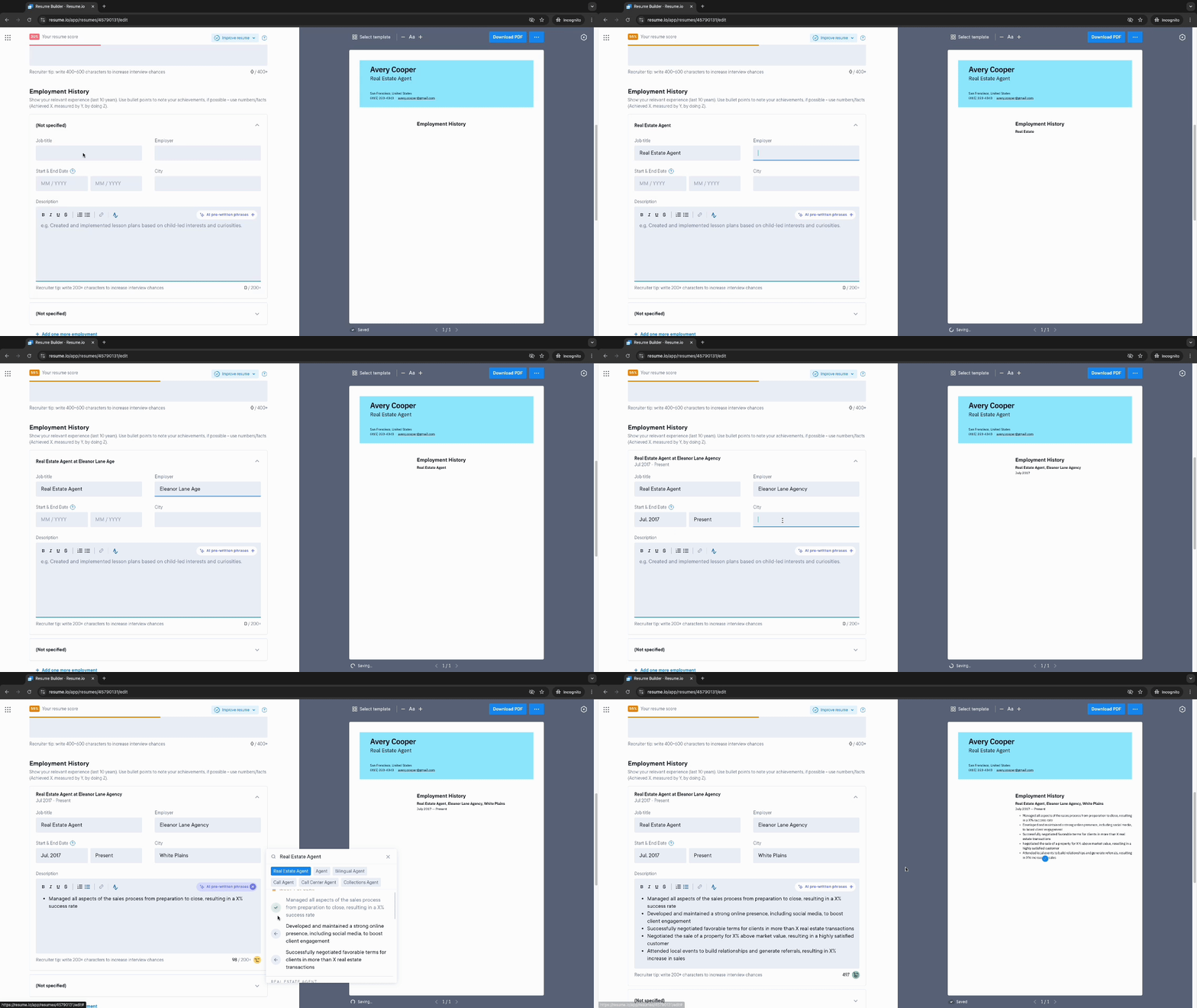
How do you list the same company twice for non-consecutive roles?
List the company twice when you left, worked somewhere else, then came back.
Treat each stretch at the employer as its own entry, placed in reverse chronological order alongside the other jobs on your resume.
Your dates make the break obvious, so a reader follows the full timeline without guessing.
Naming the employer again at each stage keeps the returning role from looking like an unexplained gap.
In the first bullet of the most recent role, you can note why the company brought you back, since a rehire is a strong endorsement of your value.
Adaptable example of non-consecutive roles at one employer:
Mackin Stores, San Diego, CA
Procurement Manager (August 2022–Present)
- Rehired to rebuild the procurement strategy, improving supply chain efficiency by 20%.
- Managed a $2 million annual budget while meeting all operational needs.
Gemini Wholesale, San Diego, CA
Quality Assurance Officer (June 2018–July 2022)
- Introduced quality controls that reduced defective goods by 12%.
- Automated order processing, cutting processing time by 20%.
Mackin Stores, San Diego, CA
Office Manager (March 2016–May 2018)
- Maintained records for invoices, purchase orders, and shipping manifests.
- Coordinated vendor deliveries and inventory tracking.
How do you show older roles in a shorter section?
Group older roles into a short career progression section when you held several older positions at one employer years ago.
List the employer then the job titles with their dates, and leave the bullet points off the oldest roles.
Removing that detail frees space for the recent experience that carries the most weight.
A career progression section works when at least three roles sit far enough in the past that their duties no longer support your current goals.
Deciding how far back to go is a judgment call, so keep your recent and relevant positions in full above this section, formatted as usual.
Adaptable example of older roles in a shorter section:
Trader Yours, San Diego, CA
Procurement Manager (August 2022-Present)
- Rebuilt the procurement strategy, improving supply chain efficiency by 20%.
- Managed a $2 million annual budget within target.
PREVIOUS EXPERIENCE
Mackin Stores, San Diego, CA
- Office Manager (October 2012-May 2018)
- Warehouse Supervisor (May 2009-September 2012)
- Warehouse Clerk (January 2007-April 2009)
How do you show two job titles held at the same time?
Show two roles held at the same time by placing both titles under one company heading with a shared or overlapping date range.
Name each title clearly, then group the bullet points so a reader can tell which work belonged to which role.
Concurrent titles are common in small teams, startups, and organizations where one person covers two functions.
Keep the two titles on separate lines rather than merging them into a single slashed label, because a merged title can read as one job and confuse applicant tracking systems.
If the two roles shared most duties, a combined bullet list is fine, as long as the titles stay visible.
Adaptable example of two concurrent roles at one company:
Brightline Media, Austin, TX
Content Manager and Social Media Lead (March 2022–Present)
- Ran the editorial calendar as Content Manager, publishing 20 articles a month.
- Owned all social channels as Social Media Lead, growing followers by 45% in a year.
- Aligned both functions to lift blog-to-signup conversions by 18%.
How do you highlight a promotion within the same company?
Highlight a promotion by making the move visible in the first bullet of your most recent role, naming the step up and what earned it.
Keep the dates on each title so the timeline shows how quickly you advanced.
A promotion is one of the strongest signals a resume can carry, since it proves an employer trusted you with more.
Amanda Augustine, Resume.io's career expert, recommends capturing these moves as they happen: "Anytime you earn a promotion, take on a new job responsibility, receive an award or complete an important certification, add it to your resume."
Recording each win in real time keeps the detail accurate when you update your resume later.
The stacked and separated formats above both work for showing a promotion on your resume, with the added step of naming the advancement directly in your bullets.
Keeping your resume current makes these wins easier to capture, and some job seekers speed up a first draft by using AI to write a resume before tailoring the format to their multiple roles.
What mistakes should you avoid when listing multiple roles?
Avoid the slips that make internal moves hard to follow.
Keep one consistent structure across every role, name each promotion instead of leaving it implied, and focus each bullet on results rather than duties.
Steering clear of a few common mistakes keeps your progression easy to read, and these are among the most practical resume tips for anyone with a long stretch at one employer.
- Inconsistent formatting: Switching between stacked, separate, and grouped layouts in one document confuses the reader. Pick one structure and hold it.
- Duties over impact: Listing responsibilities alone hides why you advanced. Lead with results and quantify them wherever you can, since only 26% of job seekers include measurable data on their resumes (Resume.io, Cover Letter Statistics, 2025).
- Hiding the shared employer: When you separate roles, repeat the company name so the shared history stays obvious.
- Overloading older roles: Trim the bullet points on early positions so your recent work stands out, rather than pushing everything onto a second page.
Key takeaways
- Group every role at one employer under a single company heading so your shared history stays clear.
- Stack job titles when the work stayed similar, and separate them when responsibilities or departments changed.
- List the employer twice when you left and later returned, keeping each period in reverse chronological order.
- Lead each bullet with a measurable result, and place your most senior role first.
- Name any promotion directly in your first bullet so your growth is impossible to miss.
Frequently asked questions
A few common questions come up when candidates format more than one role at a single employer.
Should you include every role you held at the same company?
Usually yes. Include every role that shows growth or adds skills relevant to your target job, and trim only the older positions that no longer support it, since you do not always need all of your jobs on the page.
Leaving out a promotion or a role that proves progression can make your experience look flatter than it was.
How do you list multiple positions at the same company on LinkedIn?
Add each role separately under the same employer in your Experience section, starting with the most recent.
LinkedIn groups the roles under one company automatically, which shows your progression while keeping each title, date range, and description distinct.
Does listing multiple positions at one company look like job hopping?
No. Holding several roles at one employer signals the opposite of job hopping, since it shows the company trusted you enough to promote or move you.
Group the roles under one company name so the continuity is clear at a glance.