


Proofreading your resume is the final step before submitting your application, and it plays a key role in how recruiters evaluate you.
This guide walks you through practical resume proofreading tips, common mistakes to avoid, and simple ways to check your resume thoroughly before you apply.
How can I proofread my resume?
To proofread your resume effectively, review it slowly for spelling, grammar, formatting, and consistency errors.
Use a mix of methods like reading aloud, checking it on different devices, and using editing tools.
Combining multiple techniques means you catch mistakes that a single pass will miss.
12 tips to proofreading your resume
Many candidates proofread quickly before submitting, which is when most mistakes are missed.
Use these resume proofreading tips to systematically check your resume before submitting your application.
1. Read it slowly, word by word
Read your resume carefully, focusing on one word at a time rather than scanning full sentences.
This helps you notice spelling mistakes, missing words, and punctuation errors that are easy to overlook when reading quickly.
2. Use spellcheck and editing tools
Run your resume through spellcheck tools, but review every suggestion manually.
These tools can miss incorrect word usage or suggest changes that don’t fit your intended meaning.
3. Remove repeated words and phrases
Scan your resume for repeated terms like “managed,” “responsible for,” or “team player.”
Repetition can make your writing feel generic and reduce the overall impact of your experience.
4. Replace clichés with specific language
Avoid overused phrases like “hardworking” or “results-driven” that don’t add real value.
Instead, describe what you achieved using clear, specific language that reflects your actual contributions.
5. Check for missing or incomplete sections
Make sure your resume includes key sections like contact details, summary, work experience, education, and skills.
Missing information can weaken your application or create confusion for recruiters.
6. Read your resume aloud
Reading aloud means you can identify awkward phrasing, missing words, and unclear sentences.
If something sounds unnatural when spoken, it will likely read poorly to a recruiter as well.
7. Take a break and review later
Step away from your resume and return to it after some time.
Reviewing later makes it easier to spot mistakes you missed during writing and improve clarity.
8. Print it and review on paper
A printed version can reveal formatting, spacing, and alignment issues that are harder to notice on a screen.
Seeing your resume in a different format often highlights avoidable errors you previously missed.
9. Check it on another device or format
Review your resume on a different device or temporarily change the font or size.
A new visual layout can benefit you to notice errors it previously skipped.
10. Read it backward
Start from the bottom and read upward line by line.
This removes context and aids your focus purely on spelling and grammar accuracy.
11. Check formatting and consistency
Make sure fonts, bullet points, spacing, dates, and punctuation are consistent throughout your resume.
Inconsistencies can make your document look unprofessional and harder to read.
12. Ask someone else to review it
Ask a trusted person to review your resume for errors and clarity.
A second perspective can catch issues you’ve overlooked and improve overall readability.
Overall, no single method here will pick up every mistake, so combine several of these techniques for the most reliable results.

Why is proofreading crucial for a resume?
Proofreading is crucial for a resume because even small errors can affect how hirers judge your professionalism and attention to detail.
Since resumes are reviewed quickly, mistakes in spelling, grammar, or formatting can create a negative first impression and reduce your chances of moving forward.
A resume is often seen by multiple decision-makers, and one mistake can stand out more than your achievements.
Reviewing your resume carefully helps ensure your experience is clear, consistent, and free from distractions.
Common resume language errors to fix
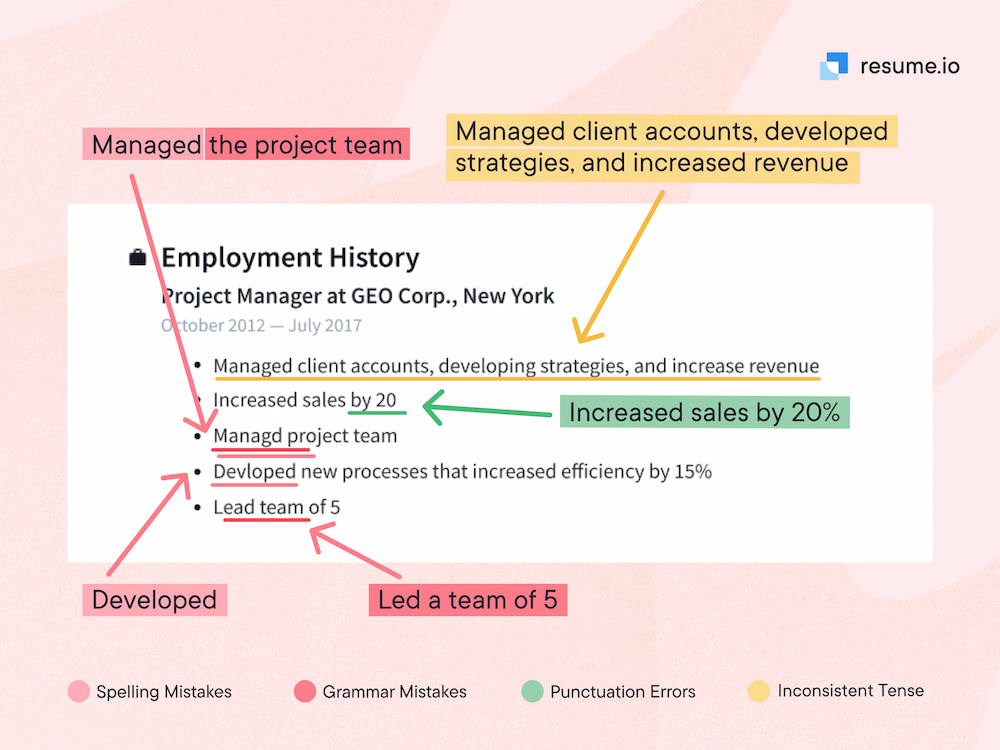
Common resume language errors include incorrect verb tense, weak or passive wording, repeated phrases, and misuse of similar-sounding words.
Fixing these issues increases clarity, strengthens your impact, and helps recruiters quickly understand your experience without confusion.
Even well-written resumes can lose impact if the language is inconsistent or unclear.
Focusing on these common errors will ensure your resume reads smoothly and presents your experience in a professional, credible way.
Language errors and how to fix them
These are the most common language mistakes hiring managers notice during resume reviews:
| Error type | Example | Fix |
|---|---|---|
| Incorrect verb tense | “Manage a team of 5” (past role) | Use past tense: “Managed a team of 5” |
| Passive language | “Responsible for managing projects” | Use active voice: “Managed projects” |
| Repeated phrases | “Managed… Managed… Managed…” | Vary verbs: “Led,” “Directed,” “Oversaw” |
| Weak wording | “Helped with reporting” | Be specific: “Prepared monthly reports” |
| Misused words | “Lead team to success” (past tense) | Use correct form: “Led team to success” |
| Overused buzzwords | “Results-driven team player” | Replace with measurable outcomes |
Detailed resume proofreading checklist
Use this resume proofreading checklist before submitting your application to ensure nothing is missed.
By working through each item, you reduce the risk of missing small but important errors and ensure your resume is clear, consistent, and ready for recruiters.
This checklist combines the most important proofreading steps into a single final review, so go through it before sending your application:
- Check spelling and grammar throughout the entire resume
- Confirm consistent verb tense (past for previous roles, present for current)
- Replace passive or weak wording with clear, active language
- Remove repeated words, phrases, or unnecessary filler
- Eliminate clichés and replace them with specific achievements
- Ensure formatting is consistent (fonts, spacing, bullet points, dates)
- Verify punctuation is consistent across all sections
- Double-check contact details (name, phone number, email)
- Confirm all sections are complete (summary, experience, education, skills)
- Read the resume aloud to catch awkward phrasing
- Review the resume on another device or printed copy
- Ask someone else to review it for clarity and errors
Using a checklist like this ensures you’re not relying on memory and assists you to spot errors before they affect your application.
When should you proofread your resume?
You should proofread your resume at multiple stages of the writing process, not just at the end.
Reviewing it as you draft and then doing a final check before submitting helps you identify both minor errors and larger clarity issues.
Spacing out your proofreading sessions also gives you fresh perspective, making it easier to spot mistakes you might otherwise miss.

Key takeaways
- Proofreading ensures your resume is clear, accurate, and ready for recruiters.
- Small errors in spelling, grammar, or formatting can negatively affect first impressions.
- Using multiple proofreading methods increases your chances of catching mistakes.
- A structured checklist helps you review your resume more thoroughly.
- Taking breaks and reviewing with fresh eyes improves accuracy.
- Getting a second opinion can highlight issues you may have missed.
Using a structured resume template can reduce formatting errors beforehand, and you can also use resume proofreading services if you want a professional second opinion.